Contrast Audit — Godot 4 UI readability audit
A downloadable plugin
Your UI looks fine in the editor. Then someone plays it on a laptop screen in a bright room, and half the interface is gone.
Contrast Audit builds each saved screen off-screen, with your game's real theme, lets the layout settle, and reads the numbers off the result. Not off your .tscn files — the numbers are not in there.
Why files can't answer this
A colour in Godot comes from a lookup that walks the override, the node's theme, every ancestor's theme, the project theme and the default theme — and is then multiplied by the modulate of everything above it. A size comes from whatever container the control landed in.
None of that exists on disk. It only exists once the scene has been built.
What it reports
- Text contrast — the WCAG 2.1 ratio between text and what is really behind it, after alpha and
modulate - Contrast in a button state — the same for
hover,pressed,disabledandfocus: the four looks nobody screenshots - Clickable area too small — interactive controls under WCAG 2.2 SC 2.5.8's 24×24, measured from the laid-out rectangle
- Font below the size floor — the resolved size in pixels, after theme scaling
- Contrast could not be verified — text on a picture or a gradient is reported as unverifiable, never quietly passed
Two findings from the bundled demo
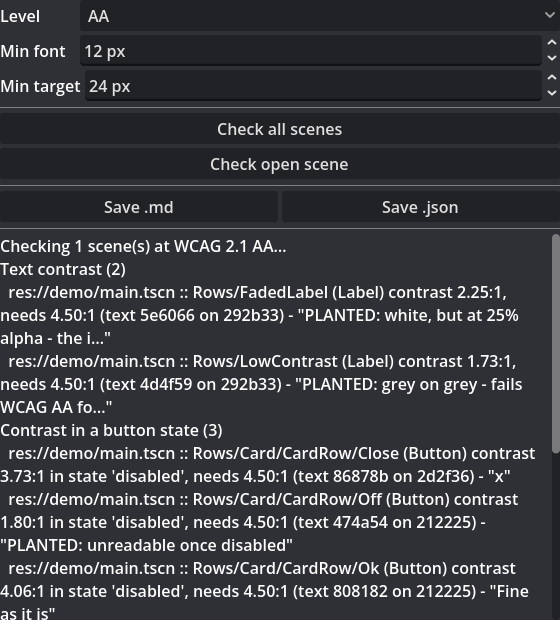
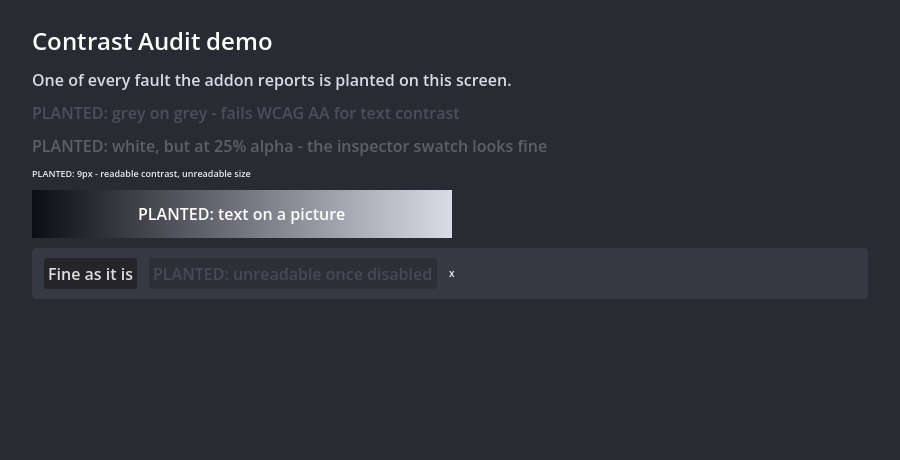
A label that is pure white and fails anyway. Its font colour is Color(1,1,1,0.25). The inspector swatch is white and looks perfect. On screen it composites to 5e6066 against the panel and lands at 2.25:1. You cannot get that number without compositing.
An ordinary button with no overrides at all. It fails at 4.06:1 once disabled — because that is what Godot's own default theme gives you. If you have never checked your disabled states, that is what is in your game right now.
Output
The dock, a Markdown report, and JSON with a versioned schema so a build server can fail on it. The JSON field names are covered by the test suite, so wiring it into CI is safe.
What it will not tell you
A clean report is a measurement against published thresholds, not a conformance claim — most accessibility barriers are not machine-checkable.
Your scripts do not run. Checks happen in the editor, and the editor only runs @tool scripts, so a screen whose ordinary _ready() sets text, swaps a colour or adds controls is measured as it was saved, without any of that. The reverse holds too: a scene's own @tool code does run inside your editor when that scene is checked.
Bold text is not detected, so the stricter large-text threshold is used throughout (it can over-report large bold text, never under-report). Hidden branches are not laid out and are skipped. Only .tscn files outside addons/ are scanned — binary .scn scenes are not. Text on a picture, a shader or a textured button state is reported as unverifiable, never as a pass. Scenes that cannot be loaded are reported as skipped — in the dock and in the saved reports — never as clean.
In the download
The addon, a demo project with one of every fault planted in it, the full README, and the licence.
How it was built
The code and this page were written with AI, directed and reviewed by a person. Every claim above is checked by an automated suite that runs on Godot 4.4 and 4.7, and by pressing the dock's own button inside a real editor on both — the numbers quoted here come out of that suite rather than being typed by hand.
Requirements
Godot 4.4 through 4.7. No C#, no build step, no external tools. One purchase, unlimited projects, commercial use included.
Purchase
In order to download this plugin you must purchase it at or above the minimum price of $12 USD. You will get access to the following files:
Leave a comment
Log in with itch.io to leave a comment.